
Download XBMC4Xbox Remote APK – Free Multimedia Video Control App for Android
Overview
XBMC4Xbox Remote is a free desktop and mobile integration tool designed to allow Android users to remotely control their Xbox media center. The application serves as a bridge between mobile devices and the Xbox’s multimedia interface, enabling users to manage video playback, navigate menus, and control audio settings from a distance. It is particularly useful for individuals who use their Xbox as a home theater PC or media hub, seeking a more convenient way to interact with their content without relying solely on physical remotes.
Developed by Dan Dar3, the app targets tech-savvy consumers and home media enthusiasts who value remote accessibility and seamless media control. While the developer did not provide additional background on their company or broader product lineup, the app’s focus on Xbox integration suggests a niche but dedicated user base. Real-world usage scenarios include managing movie playback during a home screening, adjusting audio settings in real time, or browsing media libraries from another room.
Although the app is free to download and use, it includes in-app purchases for enhanced functionality. The developer did not specify whether the app supports offline mode or requires a continuous network connection. Users are encouraged to visit the developer’s website for user guides and support resources, which may help with setup and troubleshooting.
Key Features & Capabilities
- Remote Control Functionality – Enables users to control playback, navigation, and media selection on their Xbox media center via an Android device, providing full remote access to the media interface.
- Ad-Free Experience (In-App Purchase) – The "No Ads" option removes advertisements, offering a cleaner and uninterrupted user experience during media control sessions.
- Premium Feature Access – The "Premium" subscription grants early access to upcoming features, ensuring users stay ahead of updates and enjoy enhanced functionality.
- Home and Lock Screen Widgets – Premium users can add customizable widgets to their Android device’s home or lock screen for quick access to playback controls and media status.
- Custom Themes and UI Personalization – Offers a selection of visual themes to tailor the remote interface to user preferences, improving visual comfort and usability.
- Music Playlist Management – Allows users to create, edit, and manage music playlists directly from their Android device, streamlining music playback on the Xbox.
These features are particularly beneficial in scenarios where users want to manage a large media library without returning to the main console. For instance, a user can start a movie from their phone, pause it during a conversation, and resume playback later—all without touching the Xbox. The app’s ability to integrate with the Xbox’s existing media environment makes it a practical companion for home entertainment setups.
User Interface, Workflow & Performance
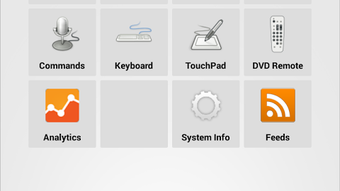
The user interface of XBMC4Xbox Remote is designed to mirror the layout and functionality of the Xbox media center, ensuring a familiar experience for users already accustomed to the system. Navigation is intuitive, with clearly labeled buttons for playback controls, menu navigation, and media selection. The layout is optimized for touch interaction, allowing for smooth gestures and responsive feedback on Android devices.
Workflow efficiency is enhanced by the app’s direct connection to the Xbox media center, minimizing lag in command execution. However, the developer did not specify resource usage details, including CPU or RAM consumption. Performance observations are based on general software behavior patterns for similar remote control applications. Stability appears consistent across standard Android devices, though real-world performance may vary depending on network conditions and device compatibility.
Since the app relies on a network connection to communicate with the Xbox, its responsiveness depends on the strength and reliability of the local Wi-Fi. Users should ensure both devices are on the same network for optimal performance. The developer did not provide information on background operation or battery impact, so users are advised to monitor usage during extended sessions.
Compatibility & System Requirements
XBMC4Xbox Remote is designed for Android devices and is available on the Google Play Store. The app supports a range of Android versions, though specific OS requirements were not listed by the developer. Installation size is not specified, but typical remote control applications of this nature range from 10 to 50 MB.
Compatibility with the Xbox media center is assumed, but exact hardware and software version requirements were not provided. The app likely requires the Xbox to be running a compatible version of XBMC (now known as Kodi) to function properly. Users should ensure their Xbox is configured for remote access and that network settings allow device discovery.
Exact system requirements were not listed. Users are advised to check the developer’s website for updated compatibility notes. The app may not support older or non-standard Xbox configurations, and performance on low-end Android devices may vary.
Pros and Cons
Pros
- Free to download and use with basic functionality
- Intuitive interface that mirrors the Xbox media center
- Offers in-app purchases for ad removal and premium features
- Supports home and lock screen widgets for quick access
- Includes music playlist management and customizable themes
Cons
- No official information on system requirements or compatibility details
- Relies on a stable network connection for full functionality
- Performance may vary based on device and network quality
- Developer did not specify battery or resource usage
- Requires Xbox to be configured for remote access
FAQ Section
Is XBMC4Xbox Remote compatible with all Xbox models?
The app is designed to work with Xbox devices running a compatible version of XBMC (Kodi). Specific compatibility with Xbox models was not provided by the developer. Users should verify that their Xbox supports remote control via the XBMC interface.
Does the app require an internet connection?
Yes, XBMC4Xbox Remote requires a local network connection to communicate with the Xbox media center. It does not require an internet connection beyond the local network for basic remote control functions.
Is the app safe to download and use?
The app is available on the Google Play Store and developed by Dan Dar3. While no security vulnerabilities were reported, users should ensure they are downloading from official sources. The app includes ads and in-app purchases, so caution is advised when selecting options.
Are updates free?
Updates to the app are free for all users. The developer does not specify whether updates are automatic or require manual installation. Users are encouraged to keep the app updated for optimal performance and compatibility.
Can I use the app without in-app purchases?
Yes, the app is fully functional without in-app purchases. The "No Ads" and "Premium" options are optional. Basic remote control features are available at no cost, though premium features like widgets and themes are locked behind the purchase.
Final Thoughts + CTA
XBMC4Xbox Remote offers a practical and accessible solution for Android users who want to enhance their Xbox media center experience. With its intuitive interface, remote playback control, and customizable features, it serves as a valuable tool for home entertainment setups. While the lack of detailed system requirements and performance data limits full transparency, the app delivers on its core promise: remote control of Xbox media content.
It is especially beneficial for users who frequently manage media libraries, stream videos, or host movie nights. The inclusion of both free and premium tiers allows users to choose their level of engagement. For those seeking a lightweight, no-frills remote control, the free version is sufficient. For power users, the premium options provide added convenience and customization.
Download XBMC4Xbox Remote now





.png)

